ALL IN ONE WEBSITE !!

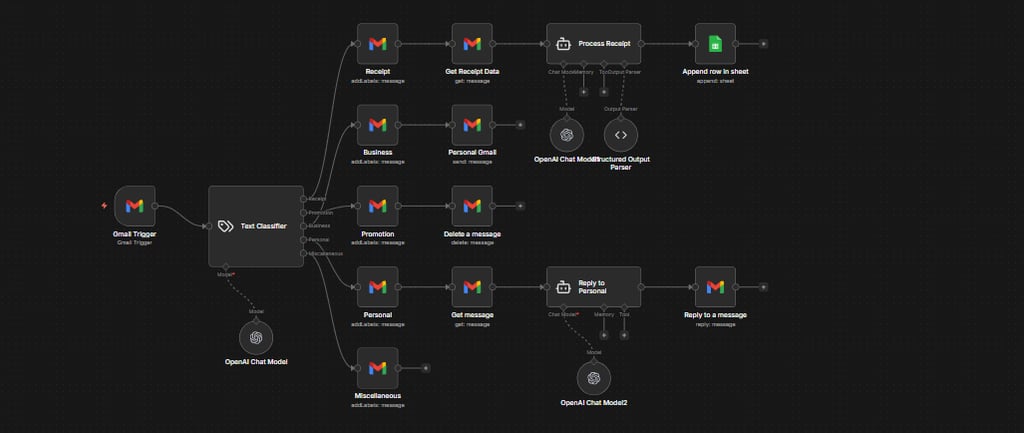
📧 AI-Powered Gmail Classification & Automation Workflow (n8n)
This n8n workflow is an AI-driven Gmail automation system that automatically reads,
classifies, and processes incoming emails using OpenAI and Google services.
🔹 1. Gmail Trigger (Inbox Watch)
The workflow starts when a new email arrives in Gmail
The email content (subject, body, sender) is passed into the automation
🔹 2. AI Email Classifier (OpenAI Chat Model)
An AI model analyzes the email
It classifies each message into predefined categories such as:
📄 Receipt
📢 Promotion
🏢 Business
👤 Personal
🌐 Social
📰 Newsletter
This replaces manual inbox sorting completely.
🔹 3. Conditional Routing (If / Switch Logic)
Based on the AI classification, emails are routed automatically
Each category follows its own logic path
🔹 4. Category-Specific Actions
Depending on the email type, the workflow can:
✉️ Business / Personal Emails
Sent to an AI Agent
AI can:
Summarize the email
Generate a smart reply
Reply is sent automatically via Gmail – Send Message
📄 Receipts
Extract key data (amount, vendor, date)
Append structured data to Google Sheets (expense tracking)
Upload attachments to Google Drive
Click on the Image to Download the Template👇👇
📢 Promotions / Newsletters / Social
Logged or ignored
Optionally summarized and stored
Prevents inbox clutter
🔹 5. AI Agent Layer (Advanced Logic)
Uses an AI Agent node powered by OpenAI
Allows multi-step reasoning:
Decide what action to take
Choose whether to respond, save, or ignore
Makes the workflow feel “human-like”
🔹 6. Google Workspace Integration
Gmail → reading & sending emails
Google Sheets → logging and tracking
Google Drive → storing files and receipts
🚀 What This Workflow Achieves
✅ Fully automated inbox management
✅ AI-based email classification
✅ Smart replies without manual effort
✅ Automatic expense & receipt tracking
✅ Zero clutter, maximum productivity
💡 Perfect Use Cases
Founders & solopreneurs
Customer support automation
Finance & receipt tracking
AI personal assistants
Inbox-zero systems
{
"receipt": {
"receipt_id": "RCPT-2026-0001",
"date": "2026-01-02",
"time": "14:05:00",
"currency": "USD",
"payment_method": "Card",
"status": "Paid",
"seller": {
"name": "Example Store",
"address": "123 Main Street, Casablanca, Morocco",
"phone": "+212 600 000 000",
"email": "contact@examplestore.ma",
"tax_id": "ICE123456789"
},
"customer": {
"name": "John Doe",
"phone": "+212 611 111 111",
"email": "john.doe@email.com"
},
"items": [
{
"item_id": "SKU-001",
"description": "Wireless Mouse",
"quantity": 1,
"unit_price": 150.00,
"total_price": 150.00
},
{
"item_id": "SKU-002",
"description": "Keyboard",
"quantity": 1,
"unit_price": 250.00,
"total_price": 250.00
}
],
"subtotal": 400.00,
"tax": {
"rate": 0.20,
"amount": 80.00
},
"discount": {
"description": "New Year Promo",
"amount": 20.00
},
"total_amount": 460.00,
"payment_details": {
"transaction_id": "TXN-987654321",
"paid_amount": 460.00,
"change": 0.00
},
"notes": "Thank you for your purchase!"
}
}
Output Parser JSON Example :