ALL IN ONE WEBSITE !!

Email Answer Approval
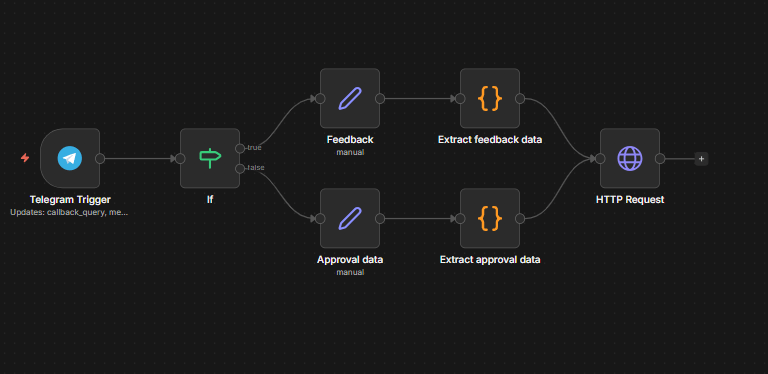
Telegram Bot Approval
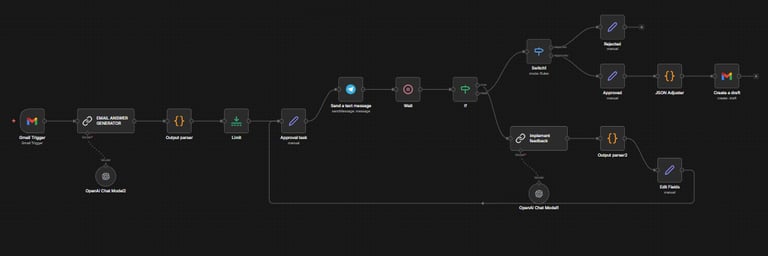
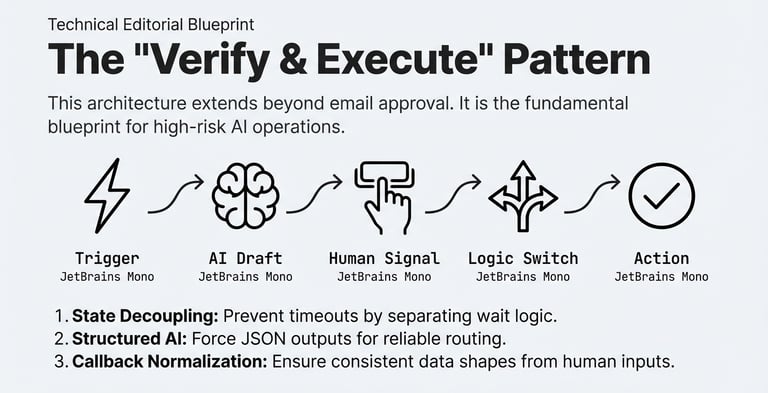
This workflow is designed to streamline the process of responding to incoming messages. The sequence begins with a Gmail trigger that activates an AI-powered text generator to draft a potential reply. Before any response is finalized, the system incorporates a human-in-the-loop step where an approval task is sent via a messaging notification. Depending on the user's feedback, a logic switch either proceeds to format the final data or routes the content back to the AI model for further revisions. This architecture ensures that artificial intelligence remains supervised by a person to maintain accuracy and quality control. Overall, the diagram depicts a sophisticated n8n automation that balances efficiency with manual oversight.
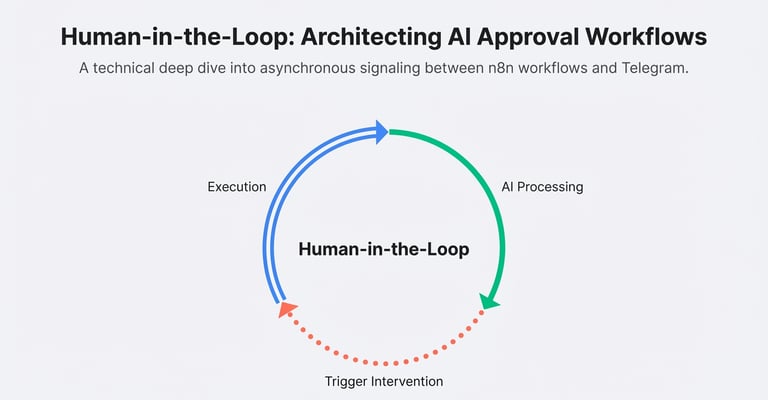
Human in the Loop
Click on the workflows to Download for FREE !!
// This loop ensures the code runs for every item in the current execution
return items.map(item => {
// 1. Get the raw data (e.g., "5051, true")
const rawExecutionData = item.json.execution_id || "";
const feedbackText = item.json.feedback || "";
// 2. Split by comma and take the first part only
const parts = rawExecutionData.split(',').map(p => p.trim());
// 3. Return the structured object without the "approval" key
return {
json: {
id: "",
feedback: feedbackText,
execution_id: parts[0] || "" // This captures just the number (e.g., "5051")
}
};
});
Extract feedback Data {}
JS Codes {}
// This loop ensures the code runs for every item in the current execution
return items.map(item => {
// 1. Get the data from the previous "Approval data" node
// We use item.json.execution_id to match your Set node exactly
const rawExecutionData = item.json.execution_id || "";
const feedbackText = item.json.feedback || "";
// 2. Split "5051, true" by the comma
const parts = rawExecutionData.split(',').map(p => p.trim());
// 3. Return the structured object n8n needs
return {
json: {
id: "",
approval: parts[1] || "", // This will be "true" or "false"
feedback: feedbackText, // This will be your Telegram message text
execution_id: parts[0] || "" // This will be "5051"
}
};
});
Extract Approval Data {}
// Add a "Code" node after your EMAIL ANSWER GENERATOR
const rawText = $input.item.json.text;
// 1. Find the JSON part inside the markdown backticks
const jsonMatch = rawText.match(/```json\n([\s\S]*?)\n```/);
if (jsonMatch && jsonMatch[1]) {
// 2. Parse the extracted string into a real JSON object
const cleanObject = JSON.parse(jsonMatch[1]);
// 3. Return the object so n8n can use 'subject' and 'body' as separate fields
return cleanObject;
}
// Fallback if no JSON found
return {
error: "Could not find JSON in response",
original: rawText
};
Output Parser { } Option 1
// Add a "Code" node after your EMAIL ANSWER GENERATOR
const rawText = $input.item.json.text;
// 1. Find the JSON part inside the markdown backticks
const jsonMatch = rawText.match(/```json\n([\s\S]*?)\n```/);
if (jsonMatch && jsonMatch[1]) {
// 2. Parse the extracted string into a real JSON object
const cleanObject = JSON.parse(jsonMatch[1]);
// --- NEW STEP: Remove newlines from all string values ---
for (const key in cleanObject) {
if (typeof cleanObject[key] === 'string') {
// Replaces all newlines with a space (prevents words from sticking together)
// Use .replace(/\n/g, "") if you want them gone entirely with no space
cleanObject[key] = cleanObject[key].replace(/\n/g, " ").trim();
}
}
// --------------------------------------------------------
// 3. Return the object so n8n can use 'subject' and 'body' as separate fields
return cleanObject;
}
// Fallback if no JSON found
return {
error: "Could not find JSON in response",
original: rawText
};
JSON Cleaner {}
Output Parser {} Option 2
const rawText = $input.item.json.text;
let parsed;
const start = rawText.indexOf('```');
const end = rawText.lastIndexOf('```');
if (start !== -1 && end !== -1 && start !== end) {
let jsonString = rawText.substring(start + 3, end).trim();
if (jsonString.startsWith('json')) {
jsonString = jsonString.substring(4).trim();
}
parsed = JSON.parse(jsonString);
} else {
const jsonStart = rawText.indexOf('{');
const jsonEnd = rawText.lastIndexOf('}');
if (jsonStart !== -1 && jsonEnd !== -1) {
parsed = JSON.parse(rawText.substring(jsonStart, jsonEnd + 1));
} else {
return {
error: "Could not find JSON in response",
original: rawText
};
}
}
return {
subject: parsed.subject || parsed.Subject || "",
body: parsed.body || parsed.Body || parsed.email_body || parsed.Message || parsed.message || ""
};
Output Parser { } Option 3
const rawText = $input.item.json.text;
let parsed;
const start = rawText.indexOf('```');
const end = rawText.lastIndexOf('```');
if (start !== -1 && end !== -1 && start !== end) {
let jsonString = rawText.substring(start + 3, end).trim();
if (jsonString.startsWith('json')) {
jsonString = jsonString.substring(4).trim();
}
parsed = JSON.parse(jsonString);
} else {
const jsonStart = rawText.indexOf('{');
const jsonEnd = rawText.lastIndexOf('}');
if (jsonStart !== -1 && jsonEnd !== -1) {
jsonSubstring = rawText.substring(jsonStart, jsonEnd + 1).trim();
jsonSubstring = jsonSubstring.replace(/[\n\r\t]/g, '').replace(/\\/g, '\\\\'); // Clean control characters and escape backslashes
parsed = JSON.parse(jsonSubstring);
} else {
return {
error: "Could not find JSON in response",
original: rawText
};
}
}
return {
subject: parsed.subject || parsed.Subject || "",
body: parsed.body || parsed.Body || parsed.email_body || parsed.Message || parsed.message || ""
};